Präzisionswerkzeuge
Zitationsmanager
Das Tool liest die bibliografischen Angaben aus Ihren Quellen aus und formatiert sie nach Bedarf – als wissenschaftlichen Nachweis oder für eine Objektbeschriftung. So müssen Sie Autor und Datum nicht immer wieder in sechs verschiedenen Stilen neu eingeben.
Wann Sie es einsetzen sollten
Immer dann, wenn eine Quelle in einem Literaturverzeichnis, einer Fußnote, einer Pressemitteilung oder einer Objektbeschriftung auftauchen soll – und das passiert bei einem Projekt ständig. Das Zitat ist nie der interessante Teil der Arbeit. Doch kaum etwas lässt wissenschaftliche Arbeit so zuverlässig nachlässig wirken wie ein fehlerhafter Nachweis. Dieses mühsame Detail ist hiermit erledigt.
Wählen Sie eine Quelle aus
Wählen Sie ein Material aus und lassen Sie die bibliografischen Metadaten auslesen – Autor, Titel, Jahr, Verlag und Publikationstyp. Das Tool liest sie aus dem Dokument aus, statt Sie die Angaben von der Titelseite abschreiben zu lassen. Es erkennt die Art der Quelle, damit bei einem Zeitschriftenaufsatz, einem Buch und einem Konferenzbeitrag jeweils die passenden Felder erfasst werden.
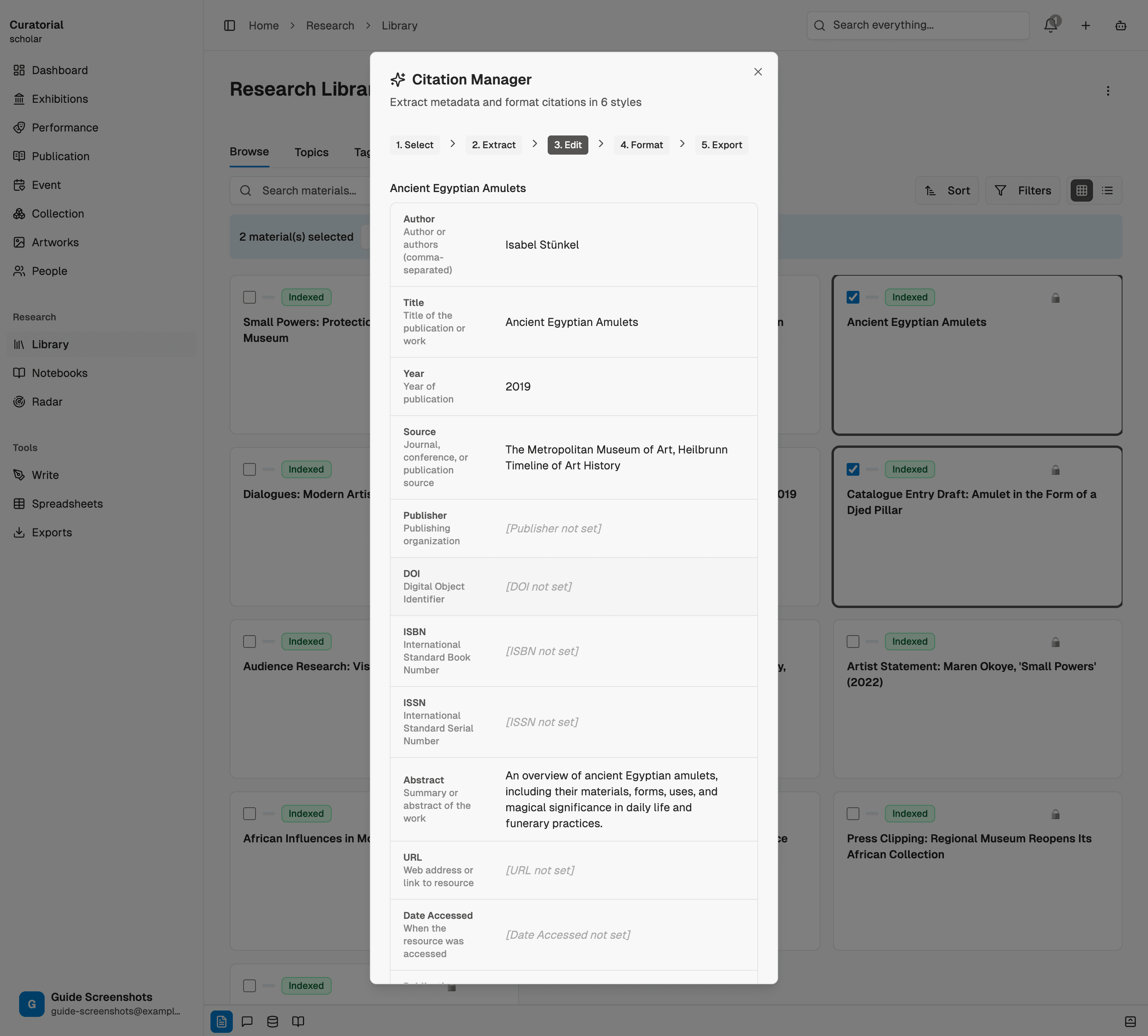
Werfen Sie vor der Formatierung einen Blick auf die ausgelesenen Angaben: Bei einem Scan eines alten Katalogs kann ein Datum falsch erkannt werden. Hier können Sie es korrigieren – ein für alle Zitierstile.
Formatieren Sie den Nachweis nach Bedarf
Erstellen Sie aus diesem einen Auslesevorgang den Nachweis im passenden Format: APA, MLA oder Chicago für wissenschaftliche Texte, BibTeX für ein LaTeX-Literaturverzeichnis oder die beiden Formate, mit denen Kuratorinnen und Kuratoren tatsächlich arbeiten – ein Nachweis für die Pressemitteilung und eine Nennung für die Objektbeschriftung. Dieselbe Quelle, korrekt aufbereitet für jeden Verwendungszweck.
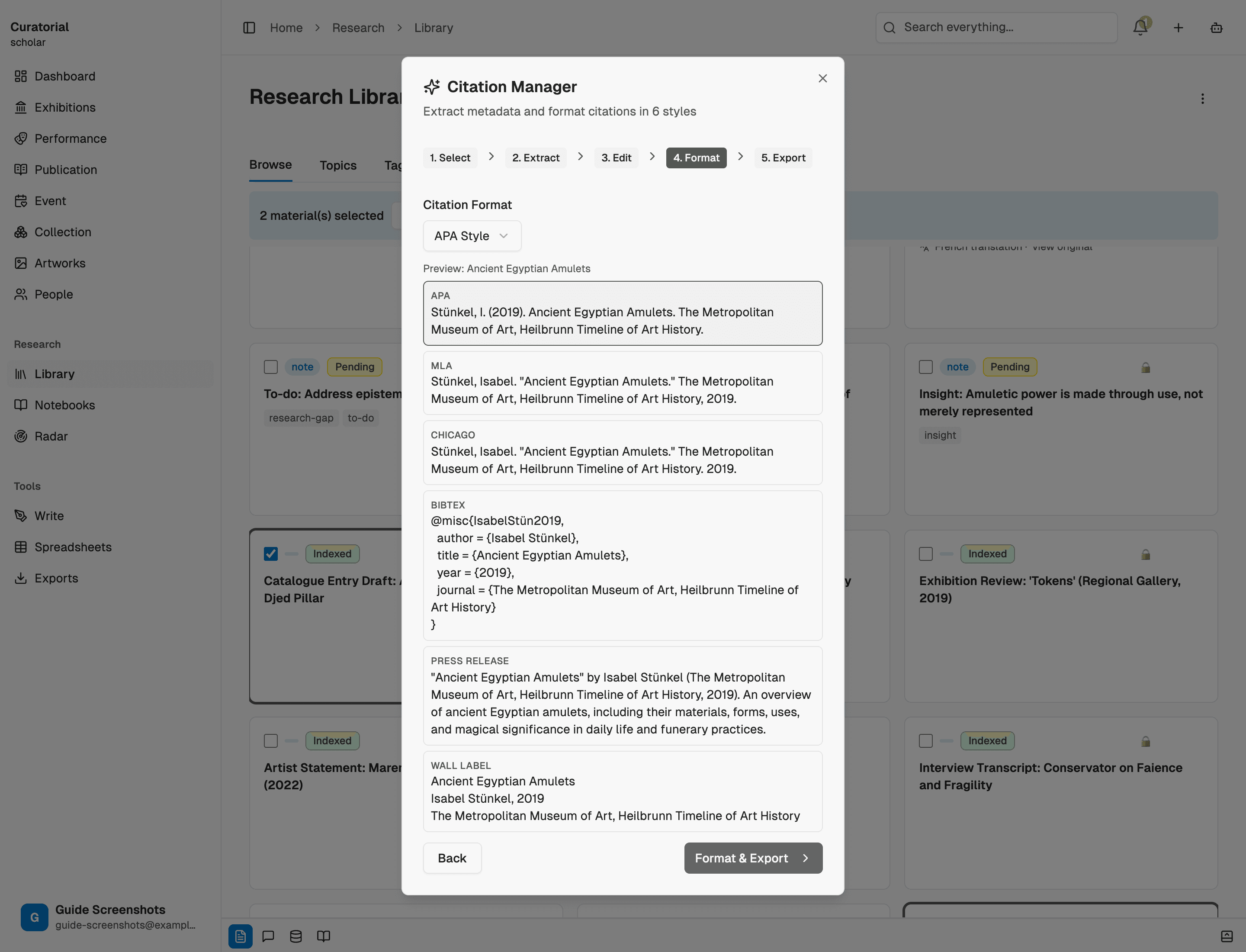
Fügen Sie den Nachweis an der richtigen Stelle ein
Übernehmen Sie den formatierten Nachweis direkt in Ihren Essay, Ihr Literaturverzeichnis, die Ausstellungsgrafik oder die Pressemitteilung. Da er auf strukturierten Metadaten basiert, lässt sich der Hausstil für ein ganzes Projekt mit einer neuen Formatierung wechseln, statt alles neu zu schreiben. Das mühsame manuelle Umformatieren eines Literaturverzeichnisses entfällt.
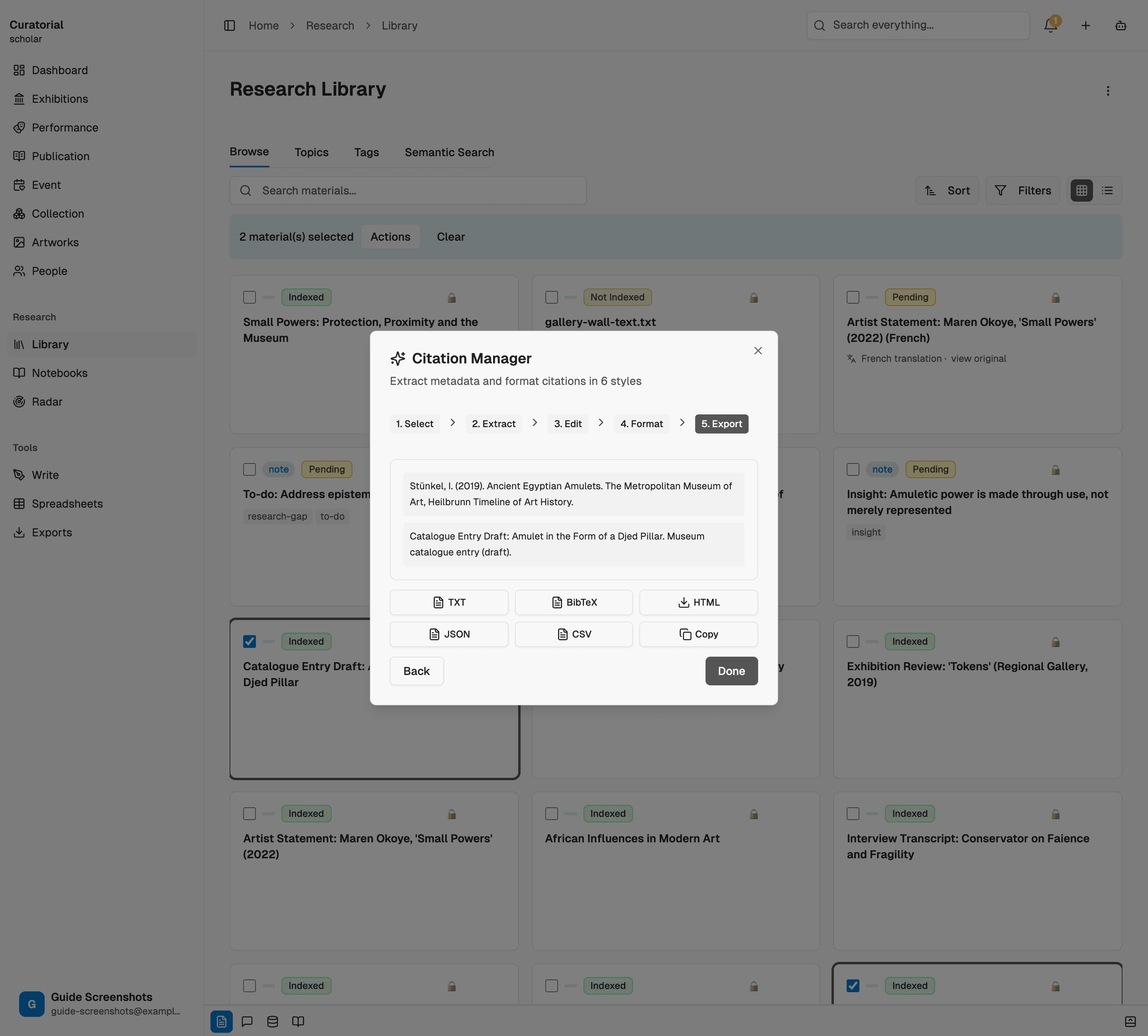
Was es leistet – und was nicht
Das Tool liest die Metadaten aus und gibt sie in sechs Formaten korrekt wieder. So wird aus einer Stunde kleinteiliger Formatierungsarbeit ein Vorgang von wenigen Sekunden. Den prüfenden Blick auf den letzten Korrekturabzug ersetzt es nicht: Eine per OCR erfasste Quelle kann einen falschen Initialbuchstaben oder ein fehlerhaft gescanntes Datum enthalten, und der Nachweis ist nur so gut wie das Feld, aus dem er stammt. Prüfen Sie die Angaben einmal beim Auslesen – danach können Sie sie beliebig formatieren.
Das Auslesen der Metadaten für einen Quellenbeleg kostet etwa 1.000 Tokens – die anschließende Umformatierung in andere Zitierstile ist praktisch kostenlos.
Wie es weitergeht
Weitere Präzisionswerkzeuge
Research Synthesis
5 minGenerate structured data matrices across multiple sources — exportable to CSV/JSON
Cultural Translation
4 minTranslate across eight languages while preserving citations and academic register
Comparative Analysis
5 minSide-by-side source comparison with contradiction scoring and common ground detection
Einmal zitieren.
Überall formatieren.
Laden Sie eine Quelle hoch und erhalten Sie ein sauberes Zitat in jedem Format, das Sie brauchen. Mit Curatorial können Sie kostenlos loslegen.
Kostenlos ausprobieren